Multiplication Color by Number Worksheets
Pick the times tables, pick a hidden picture and print. Every sheet comes with an answer key, and you can print up to 30 different versions so kids sitting together don't get the same sheet.
- Times tables 0 to 12
- Answer key included
- Color online by link
Make your sheet
Each version puts the problems in different spaces, so kids sitting together can't copy.
More options
Preview
The worksheet is loading. If nothing shows up, turn on JavaScript.
How to make a multiplication color by number
- Pick the facts. Tap a quick pick like 6s, 7s and 8s, or tick the exact times tables you want. "Each table goes up to" sets whether a table stops at × 10 or × 12.
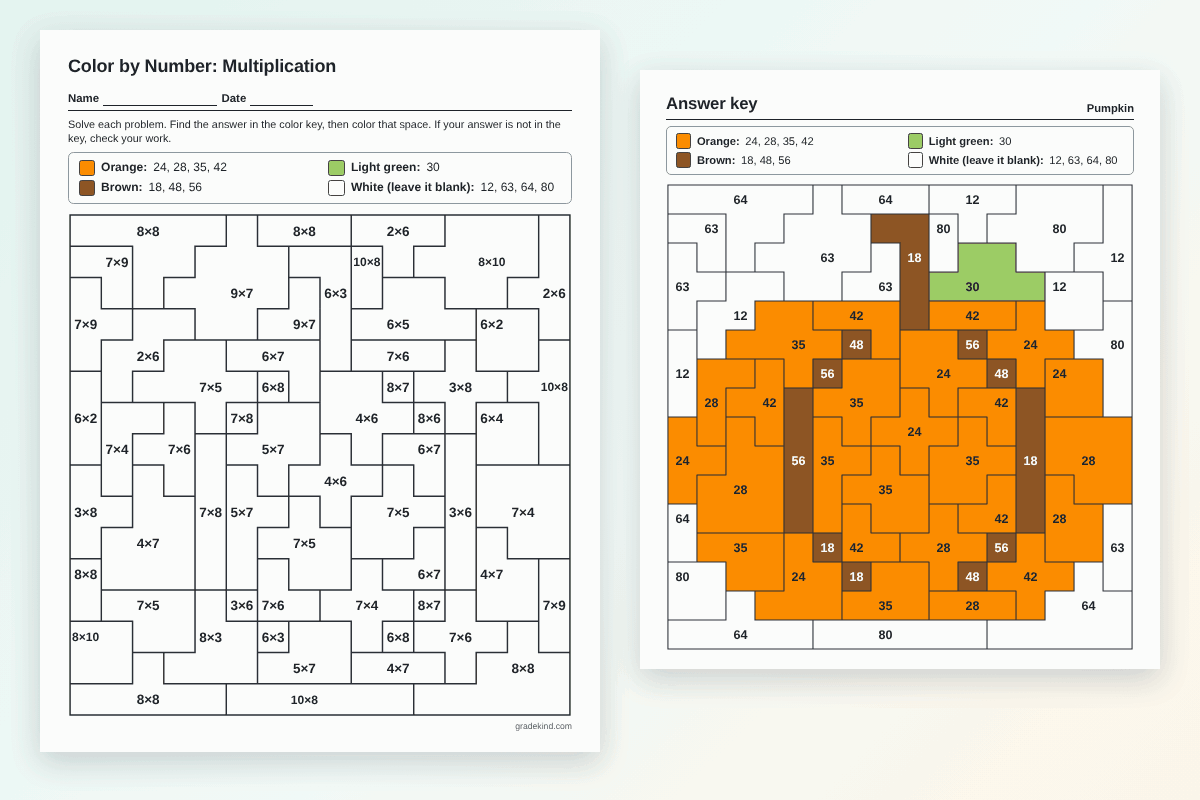
- Pick a picture. There are 31 to choose from, from an apple and a pumpkin to a rocket, a school bus and a hot air balloon. Kids don't see the picture until they color it.
- Print it or share it. Print the worksheet and the answer key, or copy the student link so kids can color it online on a Chromebook or tablet.
Why it works for times tables
Kids get a lot of practice without it feeling like a page of drills. A sheet at the standard size has about 55 problems, and the hidden picture gives them a reason to finish.
It also checks itself. Every color has one to four answers in the key. If a child gets 54 for 7 × 8, there's no 54 in the key, so they know to try again. A wrong color usually stands out once the picture starts to show, too.
Many products come from more than one fact, so 24 can be 3 × 8 in one space and 4 × 6 in the next. Kids can't just color by spotting the same problem over and over.
Which level fits your class?
| Level | Example | Usually used in |
|---|---|---|
| 2s, 5s and 10s | 5 × 7 = 35 | Start of 3rd grade |
| Times tables to 10 × 10 | 8 × 6 = 48 | 3rd grade |
| Times tables to 12 × 12 | 12 × 11 = 132 | 3rd and 4th grade |
| 2-digit × 1-digit | 47 × 6 = 282 | 4th grade |
| 2-digit × 2-digit | 34 × 26 = 884 | 4th and 5th grade |
In the Common Core standards, kids should know all products of two one-digit numbers from memory by the end of 3rd grade (3.OA.C.7). Multiplying two 2-digit numbers starts in 4th grade (4.NBT.B.5), and using the standard algorithm fluently comes in 5th grade (5.NBT.B.5).
Ideas for using them in class
- Early finishers. Keep a folder of sheets with different pictures. Kids grab one when they're done.
- One table at a time. Make a sheet with only the 7s, then one with only the 8s. You'll see fast which facts a child still counts out.
- Sub plans. Print a class set with versions, plus the keys. A sub can check a finished sheet by its colors in a few seconds.
- Seasons and holidays. A pumpkin or a leaf in the fall, a gift box in December, the "100 days" picture in winter, a heart in February and a kite in spring.
- Chromebooks or home. Copy the student link and post it in Google Classroom. Kids color on the screen, no printing needed.
Printing tips
- Each worksheet fits on one page, US Letter or A4. You can switch the paper size under "More options".
- The key writes the color name next to each swatch, so a black and white printer works fine.
- To print the answer key in color, turn on "Background graphics" in the print window.
- With more than one version, the answer keys print after the worksheets, four to a page, labeled by version.
Frequently asked questions
What is a multiplication color by number?
It's a picture split into spaces, with a multiplication problem in each space. Kids solve the problem, find the answer in the color key and color the space. When every space is colored, a hidden picture shows up.
What grade are these worksheets for?
Most teachers use them in 3rd and 4th grade, while kids learn the times tables to 10 × 10 and 12 × 12. The 2-digit by 1-digit sheets fit 4th grade, and the 2-digit by 2-digit sheets fit 4th and 5th grade.
Can each student get a different version to print?
Yes. Set Versions to the number you need, up to 30. Each version puts different problems in different spaces, so kids sitting together can't copy. Tick "A different picture for each version" if you want the pictures to change too.
Can students color it online?
Yes. Click "Copy student link" and share the link in Google Classroom or by email. Kids tap a color, then tap a space, and "Check my picture" circles any space that doesn't match the key. Progress is saved in their own browser only.
Is it free?
Yes. No account is needed, and the worksheets are made right in your browser, and nothing you pick is sent anywhere.
More free printables and tools
- Math Color by Number Generator: the same sheets for addition, subtraction, division and mixed practice.
- Division Color by Number: basic division facts, then long division that comes out even.
- Addition Color by Number: sums within 10 and 20, then 2-digit addition.
- Subtraction Color by Number: from facts within 10 and 20 up to 2-digit subtraction.
- 100th Day of School Ideas: 36 ideas plus free printables.
- Report Card Comments: a comment builder for teachers.
- Grading Charts: printable charts out of 5 to 100.
- Easy Grader: turn a score into a percent and letter grade.